
Composing a scene from several objects
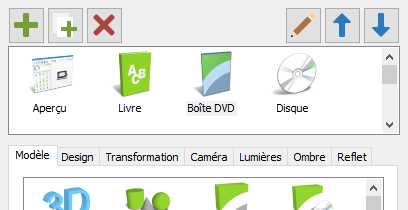
Cover Commander now allows you to compose a scene from several objects. You can see the current list of scene objects above the project settings tabs:
- Add - add a new object to scene.
- Duplicate - duplicate the current object.
- Delete - delete the selected object.
- Rename... - set a unique name for the current object.
- Move Up - move the object in the list up.
- Move Down - move the object in the list down.
To configure the properties of an object, select its name on the list:
You can change the type of a model and size on the Model tab.
Design can be changed on the Design tab.
Its relative position, rotation angles and scale can be changed on the Transformation tab.
Sujets associés
Cover Commander